> ## Documentation Index
> Fetch the complete documentation index at: https://docs-staging-fix-ss-log-app-metadata-user-metadata-clarific.mintlify.site/llms.txt
> Use this file to discover all available pages before exploring further.

> Learn how to configure an update policy form using Forms for Actions for users to review and accept new terms of service or consent updates.

# Use Cases: Configure an update policy form using Forms

<Card title="Before you start">
  1. Create a [Machine-to-Machine Application](/docs/get-started/auth0-overview/create-applications/machine-to-machine-apps) with the following scopes enabled:

  * `read:users`
  * `update:users`
  * `create:users`
  * `read:users_app_metadata`
  * `update:users_app_metadata`
  * `create:users_app_metadata`

  2. Add a [Vault connection](/docs/customize/forms/vault) using the M2M application credentials.
</Card>

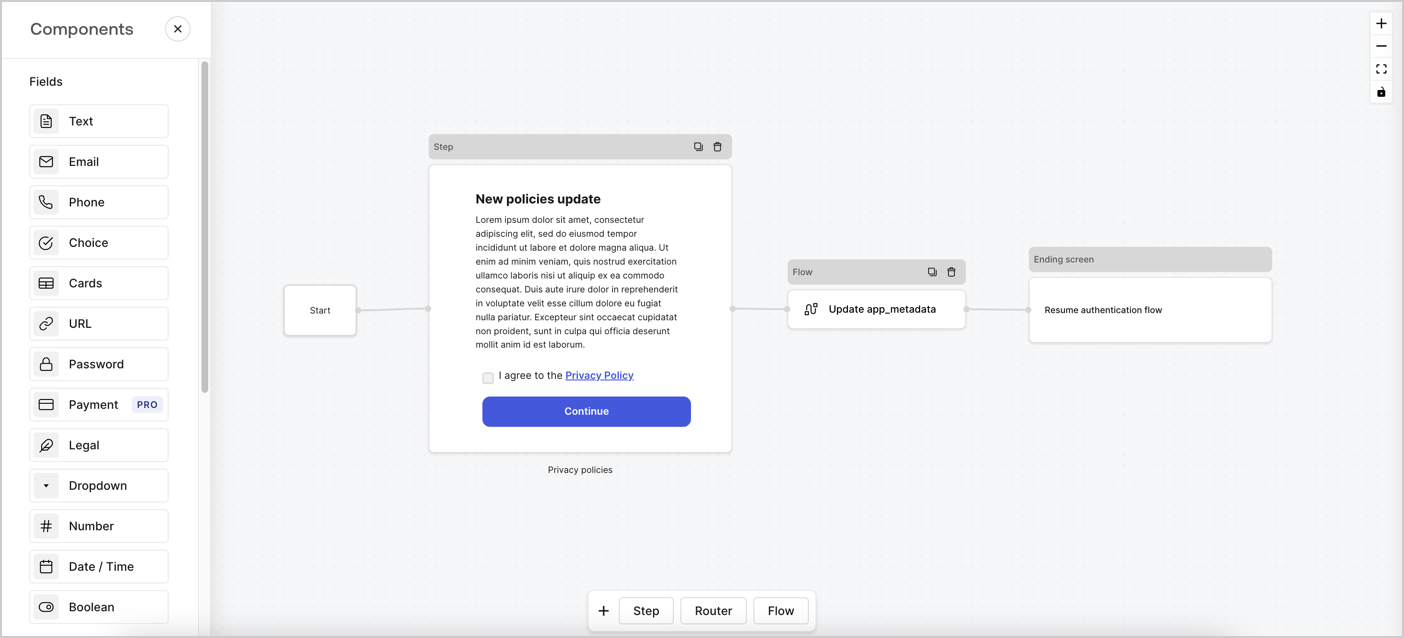
Forms for Actions allows you to create custom privacy policies flows and store the consent under the `app_metadata` object.
<Frame>
  <img src="https://mintcdn.com/docs-staging-fix-ss-log-app-metadata-user-metadata-clarific/of7ZVNXQNIxOwnRd/docs/images/cdy7uua7fh8z/6i68dMvHDTijfRmSgN1x8Q/ad900e7d4c0fb34645921435472b8684/privavy-policy-form.png?fit=max&auto=format&n=of7ZVNXQNIxOwnRd&q=85&s=1b5c29cf143069bf650c9af8c7a08b41" alt="Dashboard > Actions > Forms > Privacy policy use case" data-og-width="1404" width="1404" data-og-height="638" height="638" data-path="docs/images/cdy7uua7fh8z/6i68dMvHDTijfRmSgN1x8Q/ad900e7d4c0fb34645921435472b8684/privavy-policy-form.png" data-optimize="true" data-opv="3" srcset="https://mintcdn.com/docs-staging-fix-ss-log-app-metadata-user-metadata-clarific/of7ZVNXQNIxOwnRd/docs/images/cdy7uua7fh8z/6i68dMvHDTijfRmSgN1x8Q/ad900e7d4c0fb34645921435472b8684/privavy-policy-form.png?w=280&fit=max&auto=format&n=of7ZVNXQNIxOwnRd&q=85&s=8ae1e4e1103c5a5cc34f1d0e1da61bd9 280w, https://mintcdn.com/docs-staging-fix-ss-log-app-metadata-user-metadata-clarific/of7ZVNXQNIxOwnRd/docs/images/cdy7uua7fh8z/6i68dMvHDTijfRmSgN1x8Q/ad900e7d4c0fb34645921435472b8684/privavy-policy-form.png?w=560&fit=max&auto=format&n=of7ZVNXQNIxOwnRd&q=85&s=4523c7a71f6112e643075e16d31b0efd 560w, https://mintcdn.com/docs-staging-fix-ss-log-app-metadata-user-metadata-clarific/of7ZVNXQNIxOwnRd/docs/images/cdy7uua7fh8z/6i68dMvHDTijfRmSgN1x8Q/ad900e7d4c0fb34645921435472b8684/privavy-policy-form.png?w=840&fit=max&auto=format&n=of7ZVNXQNIxOwnRd&q=85&s=ada620d99d7d9a45361139d5d541721d 840w, https://mintcdn.com/docs-staging-fix-ss-log-app-metadata-user-metadata-clarific/of7ZVNXQNIxOwnRd/docs/images/cdy7uua7fh8z/6i68dMvHDTijfRmSgN1x8Q/ad900e7d4c0fb34645921435472b8684/privavy-policy-form.png?w=1100&fit=max&auto=format&n=of7ZVNXQNIxOwnRd&q=85&s=f350b49c3f9b2793955a163a218129b3 1100w, https://mintcdn.com/docs-staging-fix-ss-log-app-metadata-user-metadata-clarific/of7ZVNXQNIxOwnRd/docs/images/cdy7uua7fh8z/6i68dMvHDTijfRmSgN1x8Q/ad900e7d4c0fb34645921435472b8684/privavy-policy-form.png?w=1650&fit=max&auto=format&n=of7ZVNXQNIxOwnRd&q=85&s=29bc2bb41744310ba43ea1fa3881eed5 1650w, https://mintcdn.com/docs-staging-fix-ss-log-app-metadata-user-metadata-clarific/of7ZVNXQNIxOwnRd/docs/images/cdy7uua7fh8z/6i68dMvHDTijfRmSgN1x8Q/ad900e7d4c0fb34645921435472b8684/privavy-policy-form.png?w=2500&fit=max&auto=format&n=of7ZVNXQNIxOwnRd&q=85&s=e0616030d3dd39c7ef41db966fb2ddd2 2500w" />
</Frame>

The sections below outline how you can create an Update Policy form using nodes and flows, along with steps for adding your form to a [Post Login](/docs/customize/actions/explore-triggers/signup-and-login-triggers/login-trigger) Action.

## Create a form from scratch

Follow these steps to create a form to gather information:

1. Open the Form editor by selecting **Auth0 Dashboard > Actions > Forms.**
2. Select **Create Form** > **Start from scratch**.

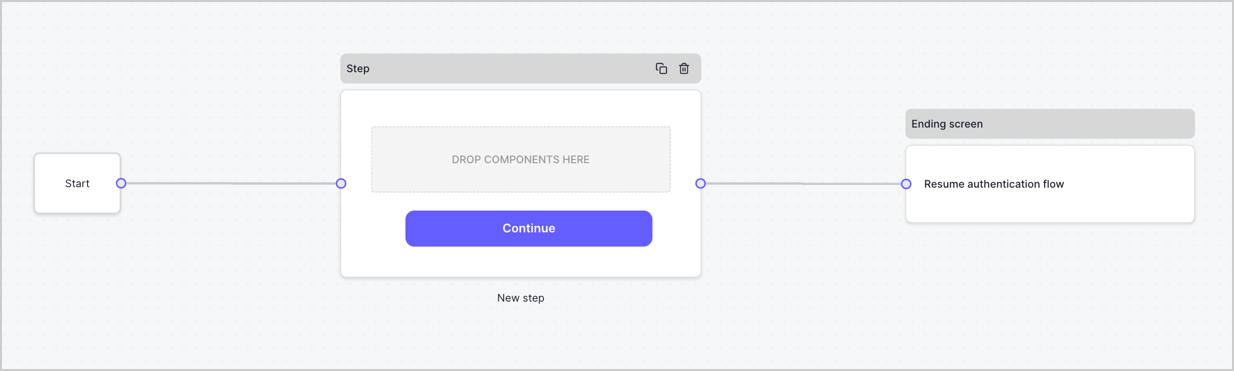
By default, a new form contains a Start node, a Step node, and an Ending screen node.
<Frame>
  <img src="https://mintcdn.com/docs-staging-fix-ss-log-app-metadata-user-metadata-clarific/QjIj_9wVkkfB0LYV/docs/images/cdy7uua7fh8z/2TZ9jSjgEcARFpULI6hz4R/a4319a1bd482f2ee5cc23100fdb2f42c/New-form-Forms-for-action-use-case.png?fit=max&auto=format&n=QjIj_9wVkkfB0LYV&q=85&s=684555b61c4c14e7bb3ac5e1655f9197" alt="Dashboard > Forms > Use Cases > Form" data-og-width="1234" width="1234" data-og-height="371" height="371" data-path="docs/images/cdy7uua7fh8z/2TZ9jSjgEcARFpULI6hz4R/a4319a1bd482f2ee5cc23100fdb2f42c/New-form-Forms-for-action-use-case.png" data-optimize="true" data-opv="3" srcset="https://mintcdn.com/docs-staging-fix-ss-log-app-metadata-user-metadata-clarific/QjIj_9wVkkfB0LYV/docs/images/cdy7uua7fh8z/2TZ9jSjgEcARFpULI6hz4R/a4319a1bd482f2ee5cc23100fdb2f42c/New-form-Forms-for-action-use-case.png?w=280&fit=max&auto=format&n=QjIj_9wVkkfB0LYV&q=85&s=54d7631f870122f8f6bd0b2cb716f96a 280w, https://mintcdn.com/docs-staging-fix-ss-log-app-metadata-user-metadata-clarific/QjIj_9wVkkfB0LYV/docs/images/cdy7uua7fh8z/2TZ9jSjgEcARFpULI6hz4R/a4319a1bd482f2ee5cc23100fdb2f42c/New-form-Forms-for-action-use-case.png?w=560&fit=max&auto=format&n=QjIj_9wVkkfB0LYV&q=85&s=3ca9b3c151b63936e3d5f22959da8801 560w, https://mintcdn.com/docs-staging-fix-ss-log-app-metadata-user-metadata-clarific/QjIj_9wVkkfB0LYV/docs/images/cdy7uua7fh8z/2TZ9jSjgEcARFpULI6hz4R/a4319a1bd482f2ee5cc23100fdb2f42c/New-form-Forms-for-action-use-case.png?w=840&fit=max&auto=format&n=QjIj_9wVkkfB0LYV&q=85&s=858b3d533e54e1176222bdc4fbcf14d7 840w, https://mintcdn.com/docs-staging-fix-ss-log-app-metadata-user-metadata-clarific/QjIj_9wVkkfB0LYV/docs/images/cdy7uua7fh8z/2TZ9jSjgEcARFpULI6hz4R/a4319a1bd482f2ee5cc23100fdb2f42c/New-form-Forms-for-action-use-case.png?w=1100&fit=max&auto=format&n=QjIj_9wVkkfB0LYV&q=85&s=5d5a44e99e903b8e7f3040b82d3ad9bb 1100w, https://mintcdn.com/docs-staging-fix-ss-log-app-metadata-user-metadata-clarific/QjIj_9wVkkfB0LYV/docs/images/cdy7uua7fh8z/2TZ9jSjgEcARFpULI6hz4R/a4319a1bd482f2ee5cc23100fdb2f42c/New-form-Forms-for-action-use-case.png?w=1650&fit=max&auto=format&n=QjIj_9wVkkfB0LYV&q=85&s=6236fc8176eb02b9fd1ec2c1d4331be2 1650w, https://mintcdn.com/docs-staging-fix-ss-log-app-metadata-user-metadata-clarific/QjIj_9wVkkfB0LYV/docs/images/cdy7uua7fh8z/2TZ9jSjgEcARFpULI6hz4R/a4319a1bd482f2ee5cc23100fdb2f42c/New-form-Forms-for-action-use-case.png?w=2500&fit=max&auto=format&n=QjIj_9wVkkfB0LYV&q=85&s=e07711b13b71a5212d82f7196e8dc6d7 2500w" />
</Frame>

### Configure the Step node

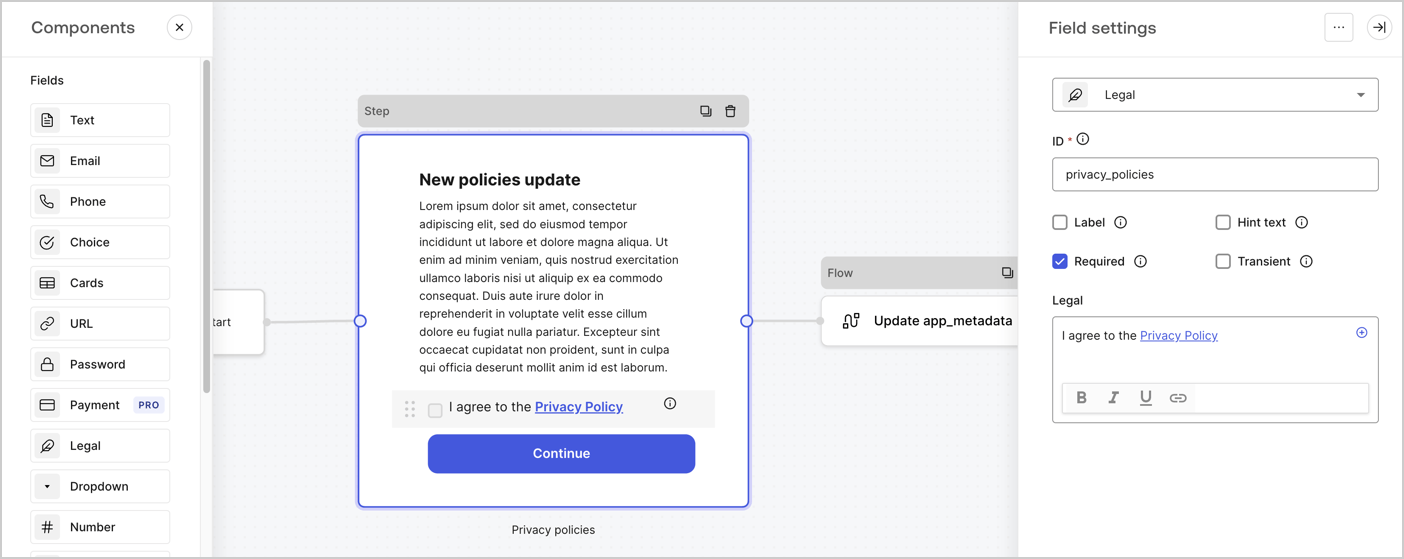
The Step node is the graphical interface visible to users. Add [Fields](/docs/customize/forms/nodes-and-components) to the Step node to collect the new agreement acceptance value by following these steps:

1. Drag a **Rich text** field from the **Components menu** into the **Step** node.

   * **Rich text**: Enter a description of your privacy policies updates.
   * Select **Save**.
2. Drag a **Legal** field into the **Step** node.

   * **ID**: Enter `privacy_policies`.
   * **Required**: Enable the checkbox.
   * **Legal**: Enter `I agree to the Privacy Policy`.
   * Select **Save**.
3. Select **Publish** to save.
<Frame>
  <img src="https://mintcdn.com/docs-staging-fix-ss-log-app-metadata-user-metadata-clarific/7JVhnXDOnKg4qiSt/docs/images/cdy7uua7fh8z/59zFFjQjAnjogkc2QGIqqJ/0ad66b1b636544122aa4e65968b76c2c/privacy-policy-step-node.png?fit=max&auto=format&n=7JVhnXDOnKg4qiSt&q=85&s=67235f17c7e01086efec59ecaaf73c83" alt="Dashboard > Actions > Forms > Use case privacy policy step node" data-og-width="1404" width="1404" data-og-height="559" height="559" data-path="docs/images/cdy7uua7fh8z/59zFFjQjAnjogkc2QGIqqJ/0ad66b1b636544122aa4e65968b76c2c/privacy-policy-step-node.png" data-optimize="true" data-opv="3" srcset="https://mintcdn.com/docs-staging-fix-ss-log-app-metadata-user-metadata-clarific/7JVhnXDOnKg4qiSt/docs/images/cdy7uua7fh8z/59zFFjQjAnjogkc2QGIqqJ/0ad66b1b636544122aa4e65968b76c2c/privacy-policy-step-node.png?w=280&fit=max&auto=format&n=7JVhnXDOnKg4qiSt&q=85&s=4304173cf0e6b3237736082eccc71f65 280w, https://mintcdn.com/docs-staging-fix-ss-log-app-metadata-user-metadata-clarific/7JVhnXDOnKg4qiSt/docs/images/cdy7uua7fh8z/59zFFjQjAnjogkc2QGIqqJ/0ad66b1b636544122aa4e65968b76c2c/privacy-policy-step-node.png?w=560&fit=max&auto=format&n=7JVhnXDOnKg4qiSt&q=85&s=22622e33f1f72a13597357f5bfb500bc 560w, https://mintcdn.com/docs-staging-fix-ss-log-app-metadata-user-metadata-clarific/7JVhnXDOnKg4qiSt/docs/images/cdy7uua7fh8z/59zFFjQjAnjogkc2QGIqqJ/0ad66b1b636544122aa4e65968b76c2c/privacy-policy-step-node.png?w=840&fit=max&auto=format&n=7JVhnXDOnKg4qiSt&q=85&s=c5c7205b93838341718fd3c0358654da 840w, https://mintcdn.com/docs-staging-fix-ss-log-app-metadata-user-metadata-clarific/7JVhnXDOnKg4qiSt/docs/images/cdy7uua7fh8z/59zFFjQjAnjogkc2QGIqqJ/0ad66b1b636544122aa4e65968b76c2c/privacy-policy-step-node.png?w=1100&fit=max&auto=format&n=7JVhnXDOnKg4qiSt&q=85&s=0a55948b30abb12cb7023373f89598d4 1100w, https://mintcdn.com/docs-staging-fix-ss-log-app-metadata-user-metadata-clarific/7JVhnXDOnKg4qiSt/docs/images/cdy7uua7fh8z/59zFFjQjAnjogkc2QGIqqJ/0ad66b1b636544122aa4e65968b76c2c/privacy-policy-step-node.png?w=1650&fit=max&auto=format&n=7JVhnXDOnKg4qiSt&q=85&s=4db43ff6f875e3d5eb406ffafb48fcc9 1650w, https://mintcdn.com/docs-staging-fix-ss-log-app-metadata-user-metadata-clarific/7JVhnXDOnKg4qiSt/docs/images/cdy7uua7fh8z/59zFFjQjAnjogkc2QGIqqJ/0ad66b1b636544122aa4e65968b76c2c/privacy-policy-step-node.png?w=2500&fit=max&auto=format&n=7JVhnXDOnKg4qiSt&q=85&s=5741dc8121c00581dfd44dcd6e8ea7ff 2500w" />
</Frame>

### Configure the Flow node

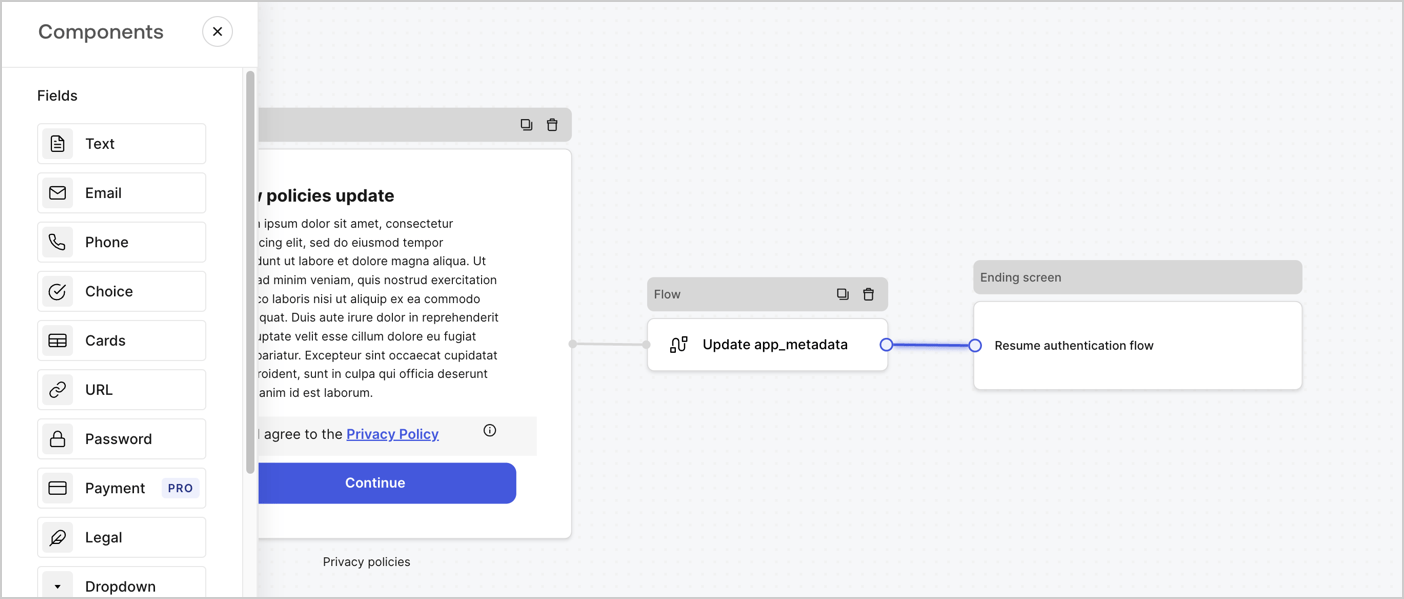
Add a **Flow** node after the **Step** node to update the `app_metadata` and resume the authentication flow by following these steps:

1. Select **Flow** from the bottom of the Form editor.
2. Remove the existing link between the **Step** and **Ending Screen** nodes.
3. Select the new **Flow** > **Click to add a flow** > **Create a new flow.**

   * Enter `Update app_metadata` in the **Name** field.
   * Select **Create**.
   * Select **Save**.
4. Link the **Flow** node to the **Step** and **Ending Screen** nodes as pictured below.
5. Select **Publish** to save.
<Frame>
  <img src="https://mintcdn.com/docs-staging-fix-ss-log-app-metadata-user-metadata-clarific/of7ZVNXQNIxOwnRd/docs/images/cdy7uua7fh8z/6YIkzm7SrpM9LW76AXuRzh/353c518fe82bbaa440836da1d83596d6/link-policies.png?fit=max&auto=format&n=of7ZVNXQNIxOwnRd&q=85&s=dc6167dd9b451ddf3e0d1d29784f048b" alt="Dashboard > Actions > Forms > Form" data-og-width="1404" width="1404" data-og-height="599" height="599" data-path="docs/images/cdy7uua7fh8z/6YIkzm7SrpM9LW76AXuRzh/353c518fe82bbaa440836da1d83596d6/link-policies.png" data-optimize="true" data-opv="3" srcset="https://mintcdn.com/docs-staging-fix-ss-log-app-metadata-user-metadata-clarific/of7ZVNXQNIxOwnRd/docs/images/cdy7uua7fh8z/6YIkzm7SrpM9LW76AXuRzh/353c518fe82bbaa440836da1d83596d6/link-policies.png?w=280&fit=max&auto=format&n=of7ZVNXQNIxOwnRd&q=85&s=948c0db8eabc8f2f4a61948d52d40b53 280w, https://mintcdn.com/docs-staging-fix-ss-log-app-metadata-user-metadata-clarific/of7ZVNXQNIxOwnRd/docs/images/cdy7uua7fh8z/6YIkzm7SrpM9LW76AXuRzh/353c518fe82bbaa440836da1d83596d6/link-policies.png?w=560&fit=max&auto=format&n=of7ZVNXQNIxOwnRd&q=85&s=b8f0d0fd308e8915c6b7f2bde7444bcf 560w, https://mintcdn.com/docs-staging-fix-ss-log-app-metadata-user-metadata-clarific/of7ZVNXQNIxOwnRd/docs/images/cdy7uua7fh8z/6YIkzm7SrpM9LW76AXuRzh/353c518fe82bbaa440836da1d83596d6/link-policies.png?w=840&fit=max&auto=format&n=of7ZVNXQNIxOwnRd&q=85&s=d6660190eeb410c9bc47248aed0da1eb 840w, https://mintcdn.com/docs-staging-fix-ss-log-app-metadata-user-metadata-clarific/of7ZVNXQNIxOwnRd/docs/images/cdy7uua7fh8z/6YIkzm7SrpM9LW76AXuRzh/353c518fe82bbaa440836da1d83596d6/link-policies.png?w=1100&fit=max&auto=format&n=of7ZVNXQNIxOwnRd&q=85&s=a3a32476e6f555e4ca7ca19860a62e2f 1100w, https://mintcdn.com/docs-staging-fix-ss-log-app-metadata-user-metadata-clarific/of7ZVNXQNIxOwnRd/docs/images/cdy7uua7fh8z/6YIkzm7SrpM9LW76AXuRzh/353c518fe82bbaa440836da1d83596d6/link-policies.png?w=1650&fit=max&auto=format&n=of7ZVNXQNIxOwnRd&q=85&s=7504d6db100f0fe9a49fd139381913d4 1650w, https://mintcdn.com/docs-staging-fix-ss-log-app-metadata-user-metadata-clarific/of7ZVNXQNIxOwnRd/docs/images/cdy7uua7fh8z/6YIkzm7SrpM9LW76AXuRzh/353c518fe82bbaa440836da1d83596d6/link-policies.png?w=2500&fit=max&auto=format&n=of7ZVNXQNIxOwnRd&q=85&s=6b7bfefb9a8f7c793b86ea587e445a32 2500w" />
</Frame>

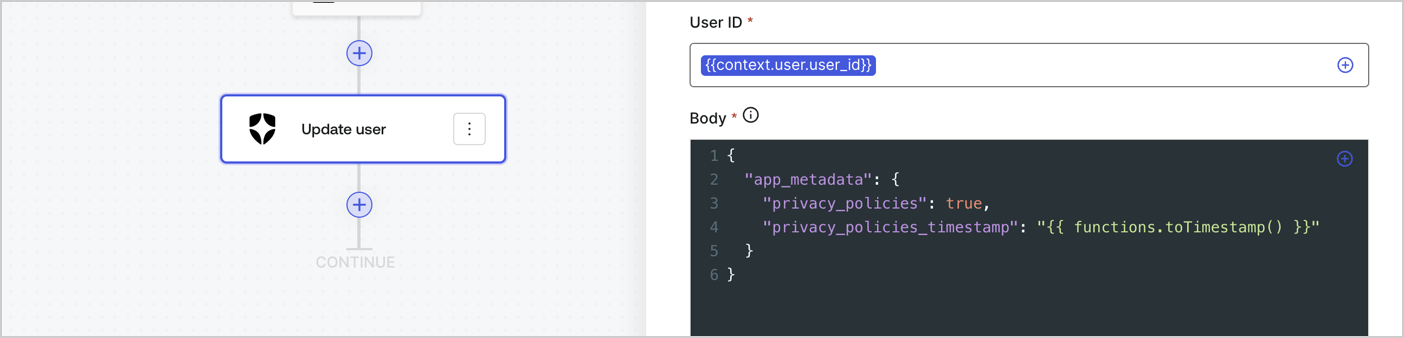
Add an Auth0 Update user action to the flow by following these steps:

1. Select the **Flow** **Update app\_metadata** > **Edit flow** to open the Flow editor in a new tab.
2. Below the StartAction, select the **+** icon to add an **Update user** action. Complete the fields below, then select **Save** to continue.

   * **Connection**: Select from the dropdown the Vault connection to your M2M application.

   * **User ID**: Enter `{{context.user.user_id}}`.

   * **Body**: Copy and paste the following code to update the app\_metadata with the privacy\_policies and privacy\_policies\_timestamp properties.

     ```text lines theme={null}
     {
       "app_metadata": {
         "privacy_policies": true,
         "privacy_policies_timestamp": "{{ functions.toTimestamp() }}"
       }
     }
     ```

   * Select **Save**.
3. Select **Publish** to save.
<Frame>
  <img src="https://mintcdn.com/docs-staging-fix-ss-log-app-metadata-user-metadata-clarific/rORA5BUvnyPhOKYB/docs/images/cdy7uua7fh8z/CvMNIwWrOUwaFW4X3G28p/1fb70ae57a20749d9ffaaba8dc0b7e26/update-user-privacy.png?fit=max&auto=format&n=rORA5BUvnyPhOKYB&q=85&s=ba086657f827e0c917aa61f0af3d7b7c" alt="Dashboard > Actions > Forms > User case privacy policy code" data-og-width="1404" width="1404" data-og-height="338" height="338" data-path="docs/images/cdy7uua7fh8z/CvMNIwWrOUwaFW4X3G28p/1fb70ae57a20749d9ffaaba8dc0b7e26/update-user-privacy.png" data-optimize="true" data-opv="3" srcset="https://mintcdn.com/docs-staging-fix-ss-log-app-metadata-user-metadata-clarific/rORA5BUvnyPhOKYB/docs/images/cdy7uua7fh8z/CvMNIwWrOUwaFW4X3G28p/1fb70ae57a20749d9ffaaba8dc0b7e26/update-user-privacy.png?w=280&fit=max&auto=format&n=rORA5BUvnyPhOKYB&q=85&s=70e19fc130a1708a588b92c8a3850136 280w, https://mintcdn.com/docs-staging-fix-ss-log-app-metadata-user-metadata-clarific/rORA5BUvnyPhOKYB/docs/images/cdy7uua7fh8z/CvMNIwWrOUwaFW4X3G28p/1fb70ae57a20749d9ffaaba8dc0b7e26/update-user-privacy.png?w=560&fit=max&auto=format&n=rORA5BUvnyPhOKYB&q=85&s=2295777bb04f6fb72f26743a225193c3 560w, https://mintcdn.com/docs-staging-fix-ss-log-app-metadata-user-metadata-clarific/rORA5BUvnyPhOKYB/docs/images/cdy7uua7fh8z/CvMNIwWrOUwaFW4X3G28p/1fb70ae57a20749d9ffaaba8dc0b7e26/update-user-privacy.png?w=840&fit=max&auto=format&n=rORA5BUvnyPhOKYB&q=85&s=e0a0a726ee9acbd106c370551f71d3f2 840w, https://mintcdn.com/docs-staging-fix-ss-log-app-metadata-user-metadata-clarific/rORA5BUvnyPhOKYB/docs/images/cdy7uua7fh8z/CvMNIwWrOUwaFW4X3G28p/1fb70ae57a20749d9ffaaba8dc0b7e26/update-user-privacy.png?w=1100&fit=max&auto=format&n=rORA5BUvnyPhOKYB&q=85&s=c2ac311e9389720d30bdeac14832991c 1100w, https://mintcdn.com/docs-staging-fix-ss-log-app-metadata-user-metadata-clarific/rORA5BUvnyPhOKYB/docs/images/cdy7uua7fh8z/CvMNIwWrOUwaFW4X3G28p/1fb70ae57a20749d9ffaaba8dc0b7e26/update-user-privacy.png?w=1650&fit=max&auto=format&n=rORA5BUvnyPhOKYB&q=85&s=e0c0ef41790d1082dcb9c6e6712eeafa 1650w, https://mintcdn.com/docs-staging-fix-ss-log-app-metadata-user-metadata-clarific/rORA5BUvnyPhOKYB/docs/images/cdy7uua7fh8z/CvMNIwWrOUwaFW4X3G28p/1fb70ae57a20749d9ffaaba8dc0b7e26/update-user-privacy.png?w=2500&fit=max&auto=format&n=rORA5BUvnyPhOKYB&q=85&s=f9feb1bc80bf0aa2eaad26fe396af57b 2500w" />
</Frame>

<Callout icon="file-lines" color="#0EA5E9" iconType="regular">
  The flow **Update app\_metadata** adds a `privacy_policies true` value to the app`_metadata` object and also generates a timestamp with a [helper function.](/docs/customize/forms/variables)
</Callout>

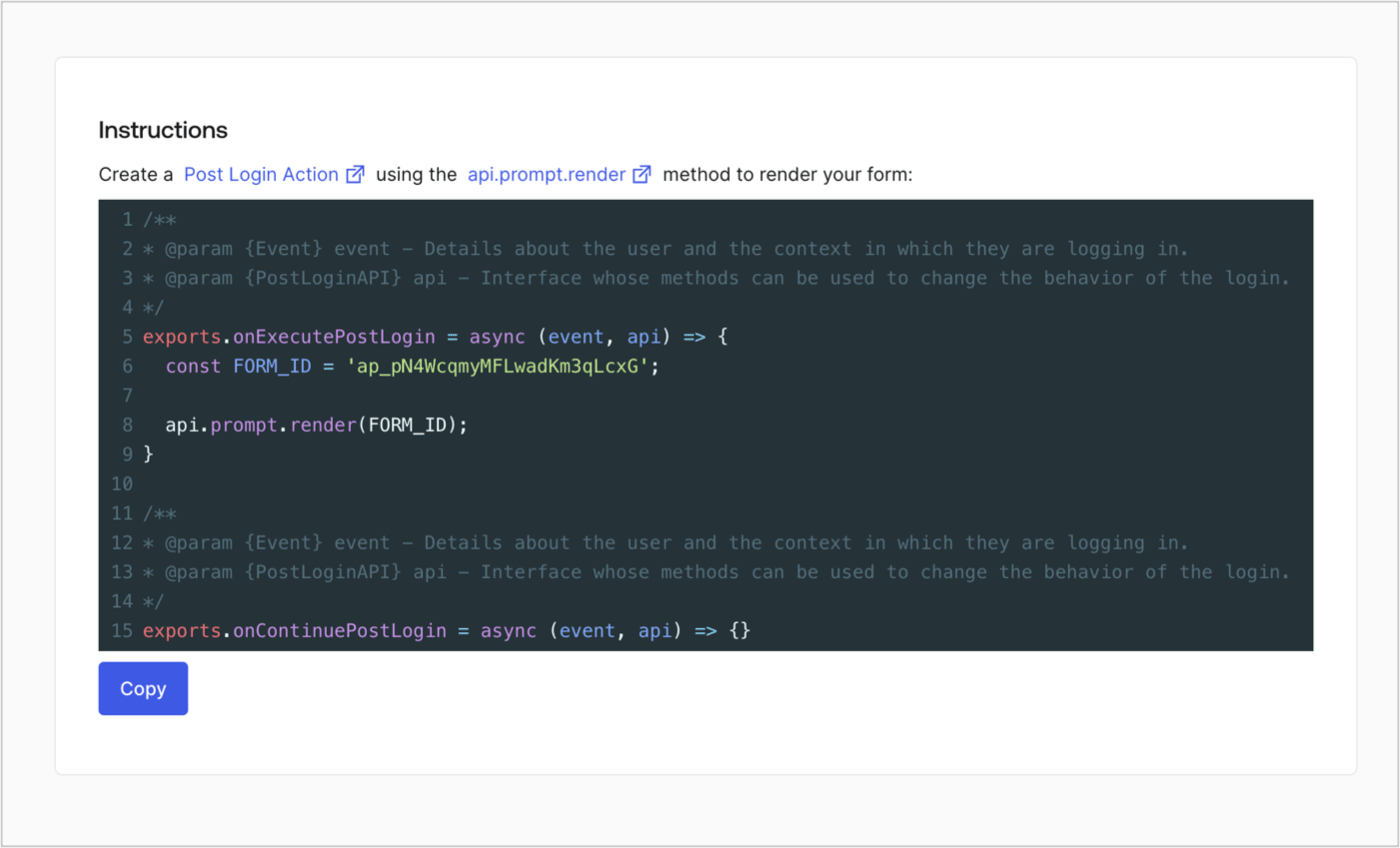
## Retrieve the form render code

Retrieve your form render code to visually render the form with a custom Post Login Action by following these steps:

* From the Form editor, select **`<> Render`**.
* Select **Copy**.
<Frame>
  <img src="https://mintcdn.com/docs-staging-fix-ss-log-app-metadata-user-metadata-clarific/gdZv38iLH4nz4NZQ/docs/images/cdy7uua7fh8z/2EIUzc539sq9lwoTKbjoJv/496a864c0fc44a782c9cadca119dbfb0/embed.png?fit=max&auto=format&n=gdZv38iLH4nz4NZQ&q=85&s=887f5f61eca5b799379310169cb9f513" alt="Dashboard > Actions > Forms > Form > Embed" data-og-width="1400" width="1400" data-og-height="848" height="848" data-path="docs/images/cdy7uua7fh8z/2EIUzc539sq9lwoTKbjoJv/496a864c0fc44a782c9cadca119dbfb0/embed.png" data-optimize="true" data-opv="3" srcset="https://mintcdn.com/docs-staging-fix-ss-log-app-metadata-user-metadata-clarific/gdZv38iLH4nz4NZQ/docs/images/cdy7uua7fh8z/2EIUzc539sq9lwoTKbjoJv/496a864c0fc44a782c9cadca119dbfb0/embed.png?w=280&fit=max&auto=format&n=gdZv38iLH4nz4NZQ&q=85&s=b5bd7204ccf488a41d4dc4240464b738 280w, https://mintcdn.com/docs-staging-fix-ss-log-app-metadata-user-metadata-clarific/gdZv38iLH4nz4NZQ/docs/images/cdy7uua7fh8z/2EIUzc539sq9lwoTKbjoJv/496a864c0fc44a782c9cadca119dbfb0/embed.png?w=560&fit=max&auto=format&n=gdZv38iLH4nz4NZQ&q=85&s=e18bdd9a8940d0fc1883e4abc45aca8d 560w, https://mintcdn.com/docs-staging-fix-ss-log-app-metadata-user-metadata-clarific/gdZv38iLH4nz4NZQ/docs/images/cdy7uua7fh8z/2EIUzc539sq9lwoTKbjoJv/496a864c0fc44a782c9cadca119dbfb0/embed.png?w=840&fit=max&auto=format&n=gdZv38iLH4nz4NZQ&q=85&s=7d8dc9916d32f7526a02679c84c1a700 840w, https://mintcdn.com/docs-staging-fix-ss-log-app-metadata-user-metadata-clarific/gdZv38iLH4nz4NZQ/docs/images/cdy7uua7fh8z/2EIUzc539sq9lwoTKbjoJv/496a864c0fc44a782c9cadca119dbfb0/embed.png?w=1100&fit=max&auto=format&n=gdZv38iLH4nz4NZQ&q=85&s=724c9269e0571649a80e0e4455aa19f4 1100w, https://mintcdn.com/docs-staging-fix-ss-log-app-metadata-user-metadata-clarific/gdZv38iLH4nz4NZQ/docs/images/cdy7uua7fh8z/2EIUzc539sq9lwoTKbjoJv/496a864c0fc44a782c9cadca119dbfb0/embed.png?w=1650&fit=max&auto=format&n=gdZv38iLH4nz4NZQ&q=85&s=9c9d2926bba8ac8375cf7b9421db317f 1650w, https://mintcdn.com/docs-staging-fix-ss-log-app-metadata-user-metadata-clarific/gdZv38iLH4nz4NZQ/docs/images/cdy7uua7fh8z/2EIUzc539sq9lwoTKbjoJv/496a864c0fc44a782c9cadca119dbfb0/embed.png?w=2500&fit=max&auto=format&n=gdZv38iLH4nz4NZQ&q=85&s=5502d0b53e11b0124f850c25a9cc55da 2500w" />
</Frame>

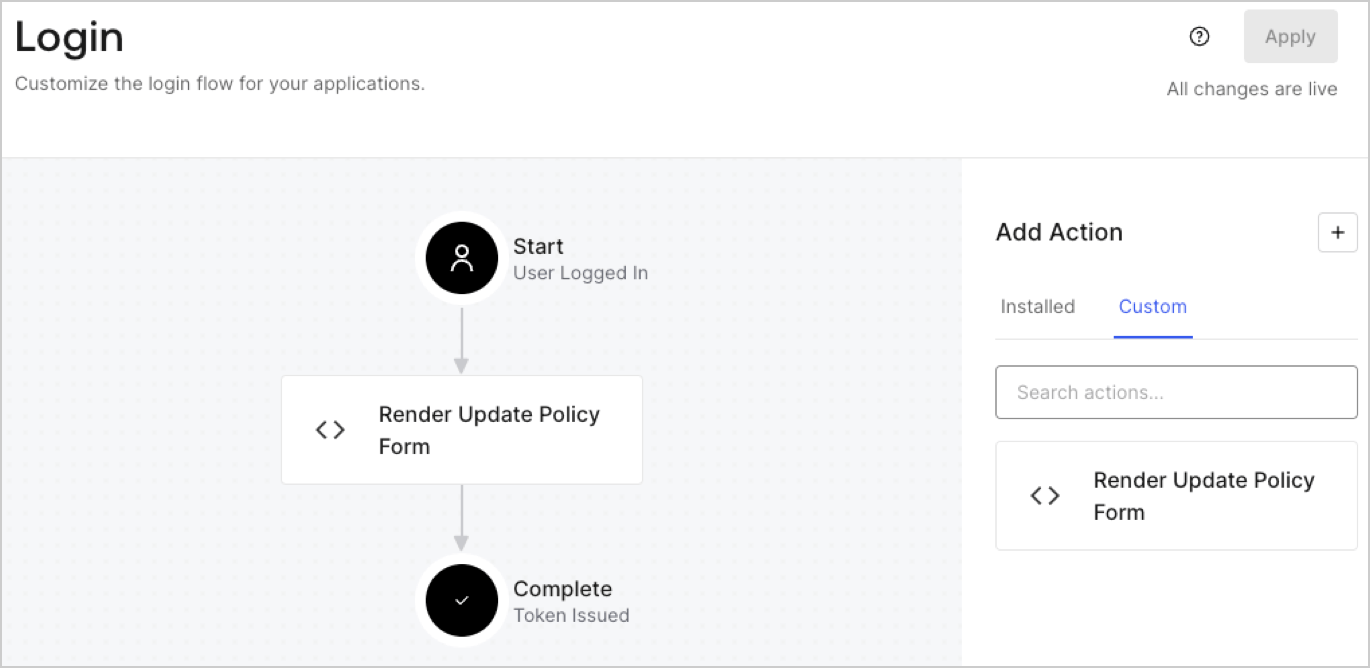
## Create a Post Login Action

Create a post-login Action to render your form by following these steps:

1. Navigate to **Auth0 Dashboard > Actions > Flows > Login.**
2. Select the **+** icon and Select **Build from scratch**:

   * **Name**: Enter `Render Update Policy Form`.
   * **Trigger**: Select `Login / Post Login`.
   * **Runtime**: Select the recommended version.
3. Select **Create**.

To configure the post-login Action:

1. Delete the existing code from the Code editor.
2. Paste the form render code into the Code editor.
3. Edit the code to define the conditional logic that will render the form.

   ```javascript lines theme={null}
   /**
   * @param {Event} event - Details about the user and the context in which they are logging in.
   * @param {PostLoginAPI} api - Interface whose methods can be used to change the behavior of the login.
   */
   exports.onExecutePostLogin = async (event, api) => {
     const FORM_ID = 'REPLACE_WITH_YOUR_FORM_ID';

     if (event.user.app_metadata.privacy_policies !== true) {
       api.prompt.render(FORM_ID);
     }
   }

   exports.onContinuePostLogin = async (event, api) => { }
   ```

   <Callout icon="file-lines" color="#0EA5E9" iconType="regular">
     The example code above will render the form when a user is missing the app metadata `privacy_policies` property.
   </Callout>
4. Select **Deploy.**
5. Drag and Drop the **Render Update Policy Form** Action to the **Login** flow.
   <Frame>
     <img src="https://mintcdn.com/docs-staging-fix-ss-log-app-metadata-user-metadata-clarific/XNdc3GsPkTsMpUXd/docs/images/cdy7uua7fh8z/5TOwDgevZsBqd7yZynUYWU/41ca909dc3007aed4f40ff794a05efa5/postlogin.png?fit=max&auto=format&n=XNdc3GsPkTsMpUXd&q=85&s=84abc48f45d7135681e6aec5b20752ad" alt="Dashboard > Forms > Use Case > Render update policy form login action" data-og-width="1370" width="1370" data-og-height="668" height="668" data-path="docs/images/cdy7uua7fh8z/5TOwDgevZsBqd7yZynUYWU/41ca909dc3007aed4f40ff794a05efa5/postlogin.png" data-optimize="true" data-opv="3" srcset="https://mintcdn.com/docs-staging-fix-ss-log-app-metadata-user-metadata-clarific/XNdc3GsPkTsMpUXd/docs/images/cdy7uua7fh8z/5TOwDgevZsBqd7yZynUYWU/41ca909dc3007aed4f40ff794a05efa5/postlogin.png?w=280&fit=max&auto=format&n=XNdc3GsPkTsMpUXd&q=85&s=495af612a1dea6895ab0c0f9df93827e 280w, https://mintcdn.com/docs-staging-fix-ss-log-app-metadata-user-metadata-clarific/XNdc3GsPkTsMpUXd/docs/images/cdy7uua7fh8z/5TOwDgevZsBqd7yZynUYWU/41ca909dc3007aed4f40ff794a05efa5/postlogin.png?w=560&fit=max&auto=format&n=XNdc3GsPkTsMpUXd&q=85&s=e0c3d3f8c8a0e4171d89655c777d9670 560w, https://mintcdn.com/docs-staging-fix-ss-log-app-metadata-user-metadata-clarific/XNdc3GsPkTsMpUXd/docs/images/cdy7uua7fh8z/5TOwDgevZsBqd7yZynUYWU/41ca909dc3007aed4f40ff794a05efa5/postlogin.png?w=840&fit=max&auto=format&n=XNdc3GsPkTsMpUXd&q=85&s=b75f9a7554e40a75ec2bc5f5945caaf6 840w, https://mintcdn.com/docs-staging-fix-ss-log-app-metadata-user-metadata-clarific/XNdc3GsPkTsMpUXd/docs/images/cdy7uua7fh8z/5TOwDgevZsBqd7yZynUYWU/41ca909dc3007aed4f40ff794a05efa5/postlogin.png?w=1100&fit=max&auto=format&n=XNdc3GsPkTsMpUXd&q=85&s=d9d4ba531b6213d8000f928a0458b33a 1100w, https://mintcdn.com/docs-staging-fix-ss-log-app-metadata-user-metadata-clarific/XNdc3GsPkTsMpUXd/docs/images/cdy7uua7fh8z/5TOwDgevZsBqd7yZynUYWU/41ca909dc3007aed4f40ff794a05efa5/postlogin.png?w=1650&fit=max&auto=format&n=XNdc3GsPkTsMpUXd&q=85&s=e218a9098f41d4040a10d5e6bed8624f 1650w, https://mintcdn.com/docs-staging-fix-ss-log-app-metadata-user-metadata-clarific/XNdc3GsPkTsMpUXd/docs/images/cdy7uua7fh8z/5TOwDgevZsBqd7yZynUYWU/41ca909dc3007aed4f40ff794a05efa5/postlogin.png?w=2500&fit=max&auto=format&n=XNdc3GsPkTsMpUXd&q=85&s=09e9aed98ab9c510e04cb6212a07f768 2500w" />
   </Frame>
6. Select **Apply.**

### Test implementation

Test the implementation by following these steps:

1. Log in with an existing user whose app`_metadata` attribute `privacy_policies` does not have a value.
2. The post-login Action in the Login flow will render the form and prompt for acceptance.
3. Select **Auth0 Dashboard > User Management > Users,** locate the user and verify that the `app_metadata` attribute `privacy_policies` contains a `true` value and a timestamp.
